New orders
See incoming orders in a dedicated column so the kitchen can identify work waiting to begin.
 CodesKitchen← Back to homeStart a project ↗
Give your service and kitchen teams a shared view of restaurant orders. Watch our kitchen display demo: orders move through New, Cooking and Ready, with order numbers and item names visible at each stage.
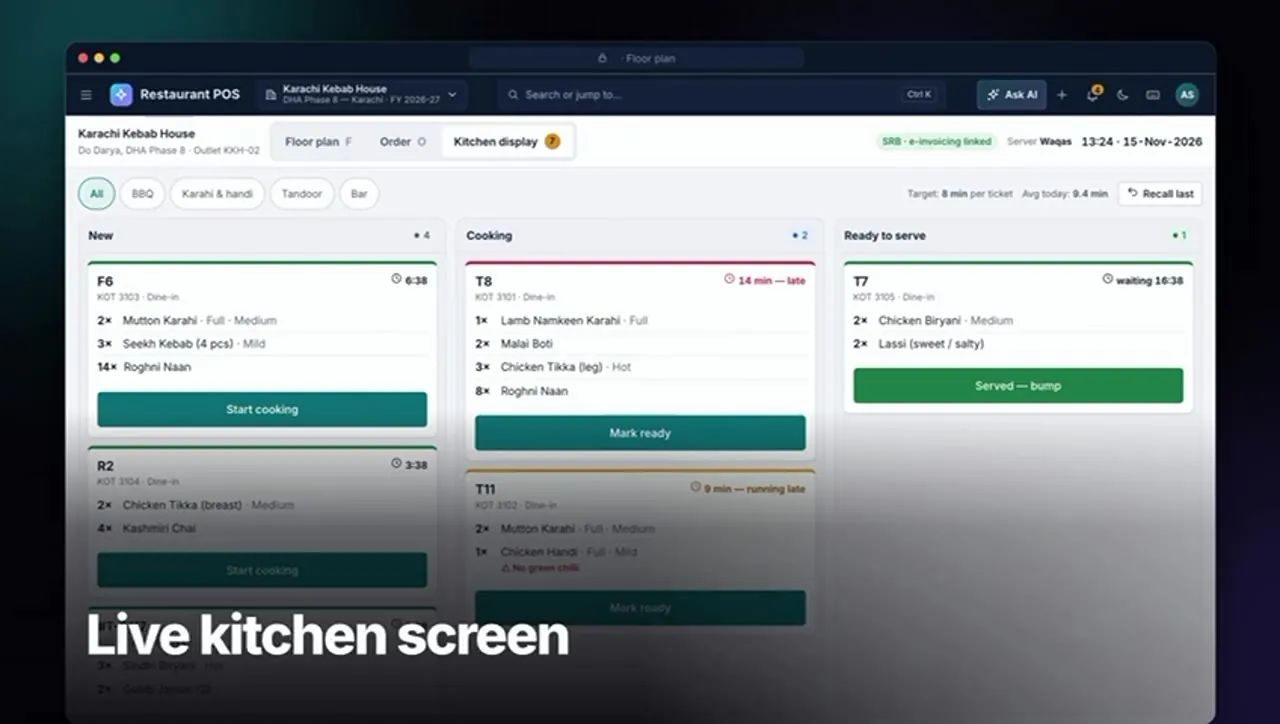
The video shows a kitchen display with order numbers, item names and three preparation stages: New, Cooking and Ready. Use it as a starting point for discussing how your team receives, prepares and hands over orders.
This is a demonstration of a specific workflow. Features, integrations and delivery scope for your system are agreed before development.
See incoming orders in a dedicated column so the kitchen can identify work waiting to begin.
Follow orders through New, Cooking and Ready stages on a clear kitchen display.
Keep order numbers and item names visible alongside each preparation stage.
Start with your order flow: how orders arrive, who updates their status, and how ready orders reach the service team. We can then scope the screens, permissions and any supported POS integrations your restaurant needs.
We define the first release with you, demonstrate progress during development, and test the agreed workflows before handover.
Explore our custom software development services ↗List where orders arrive today: a POS, online ordering service or a manual workflow. We review API access before proposing any connection.
Define who can view orders, update preparation stages and confirm handover. Include your intended devices and kitchen stations in the brief.
Agree the first-release workflows and test scenarios before development. Review updates during the build, then test the agreed scope before handover.
Need customer records, billing or stock management too? These are separate requirements to scope, rather than features demonstrated in the kitchen video.
The video demonstrates a kitchen order workflow. Billing, payments, reservations, stock management and POS connections would be reviewed and scoped separately.
We can assess an integration after reviewing your provider’s API, available access and the order information that needs to move between systems.
We estimate after reviewing your workflow, users, screens, integrations and launch priorities. Book a free demo to discuss what your business needs.
An existing product may suit a standard workflow. Custom development is worth discussing when your order sources, permissions or handover process need a different approach. We review those needs before recommending a build.
Share your current order flow, ordering or POS provider, user roles and any screens you already use. We can walk through the demonstration and discuss what would need to change for your restaurant.
Tell us where orders come from, who updates preparation stages and how the service team receives ready orders. We’ll review the screens and any supported ordering integrations before estimating a first release.